

07
Nov
“Kick-off” for MailStore Server at the English Professional Footballers Association (PFA)
The Professional Footballers Association has been working since 1907 to ensure that the rights and salary conditions of the professional players in England are protected and extended. Now a new defensive...

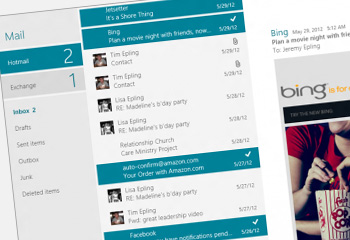 One of the most notable changes visually in Windows 8 is the range of new apps that now appear on the "Start" page. In a similar vein to mobile devices, there are email and calendar apps which now integrate tightly, offering handy features such as notifications.
It's easy to see why some users will end up switching to this as their preferred method of access, so in this post I'll show you how to configure MDaemon to synchronise with these two key apps.
One of the most notable changes visually in Windows 8 is the range of new apps that now appear on the "Start" page. In a similar vein to mobile devices, there are email and calendar apps which now integrate tightly, offering handy features such as notifications.
It's easy to see why some users will end up switching to this as their preferred method of access, so in this post I'll show you how to configure MDaemon to synchronise with these two key apps.
 If you’re new to MDaemon and want a quick and easy way to get up to speed on the features it offers, I've just added a brand new webinar you should find ideal.
During this one hour session I'll focus on the user’s experience via Outlook and MDaemon’s
If you’re new to MDaemon and want a quick and easy way to get up to speed on the features it offers, I've just added a brand new webinar you should find ideal.
During this one hour session I'll focus on the user’s experience via Outlook and MDaemon’s  Alt-N have just released an update for MDaemon Messaging Server. It only consists of a couple of minor fixes but they are important ones so we highly recommend you download and install this new version A.S.A.P.
 I could tell you all about the exciting new version 7 of BackupAssist which is just around the corner - unfortunately if I do that I'll have some angry Australian developers after my blood!
 A quick Google search produces plenty of opinion pieces out there on cloud computing adoption, but as the