25
Feb


 The latest major new release of MailStore is now live and available for download from our Web site.
Version 8.0 brings a selection of updates and fixes along with new support for Microsoft Exchange Server 2013 and Microsoft Outlook 2013 (including Click-to-Run for Office 365). For those of you running Outlook 2010 64-bit there is also a 64-bit version of the MailStore client available.
The latest major new release of MailStore is now live and available for download from our Web site.
Version 8.0 brings a selection of updates and fixes along with new support for Microsoft Exchange Server 2013 and Microsoft Outlook 2013 (including Click-to-Run for Office 365). For those of you running Outlook 2010 64-bit there is also a 64-bit version of the MailStore client available.
05
Feb
Blackberry Z10 user? We need you!
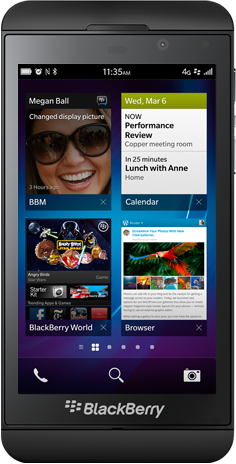 With the release of BlackBerry v10.0 last week, the method for synchronising the new set of BlackBerry 10 devices with MDaemon has changed. A BlackBerry Enterprise Server (BES) is no longer required for synchronisation, and handsets now use the ActiveSync standard for personal data synchronisation.
The process of setting up an ActiveSync account on a BlackBerry 10 device is actually quite similar to the Android and iOS devices, requiring just the server details, email address and password in order to connect.
With the release of BlackBerry v10.0 last week, the method for synchronising the new set of BlackBerry 10 devices with MDaemon has changed. A BlackBerry Enterprise Server (BES) is no longer required for synchronisation, and handsets now use the ActiveSync standard for personal data synchronisation.
The process of setting up an ActiveSync account on a BlackBerry 10 device is actually quite similar to the Android and iOS devices, requiring just the server details, email address and password in order to connect.
30
Nov
Why we recommend against the “archive to PST” feature in Outlook
 If you're a small business user looking for ways to manage large amounts of email residing in your server or mailbox, the built-in archiving features of Outlook can understandably look pretty tempting. They're easy to use, they're right there in front of you and perhaps what makes them most attractive, they're free!
However, as you've probably anticipated from the title of my post, we're not the greatest fan of archiving to PST as a long-term solution to the issue and there are number of considerations worth being aware of before you rely on this as the primary method for archiving your company's email communications.
If you're a small business user looking for ways to manage large amounts of email residing in your server or mailbox, the built-in archiving features of Outlook can understandably look pretty tempting. They're easy to use, they're right there in front of you and perhaps what makes them most attractive, they're free!
However, as you've probably anticipated from the title of my post, we're not the greatest fan of archiving to PST as a long-term solution to the issue and there are number of considerations worth being aware of before you rely on this as the primary method for archiving your company's email communications.
13:11 /
MailStore
29
Nov
MailStore and MDaemon – Technology and Marketing Partnership announced
[caption id="" align="alignright" width="314"] Heinz Wietfeld (Global Sales Director at MailStore) & Jerry Donald (Co-CEO at Alt-N Technologies)[/caption] MailStore offers first-class integration with MDaemon Messaging Server, the popular email server for...
29
Nov
Meet MailStore – Your New Best Friend (An end user’s guide)
So you've just been told Outlook is going to look a bit different. Your IT support person has installed this new-fangled "MailStore" system to help "reduce load" on the email...
02
Nov
Synchronise your Windows 8 email and calendar apps with MDaemon
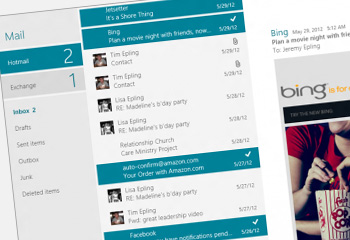 One of the most notable changes visually in Windows 8 is the range of new apps that now appear on the "Start" page. In a similar vein to mobile devices, there are email and calendar apps which now integrate tightly, offering handy features such as notifications.
It's easy to see why some users will end up switching to this as their preferred method of access, so in this post I'll show you how to configure MDaemon to synchronise with these two key apps.
One of the most notable changes visually in Windows 8 is the range of new apps that now appear on the "Start" page. In a similar vein to mobile devices, there are email and calendar apps which now integrate tightly, offering handy features such as notifications.
It's easy to see why some users will end up switching to this as their preferred method of access, so in this post I'll show you how to configure MDaemon to synchronise with these two key apps.
03
Oct
MDaemon v13.0.1 now available for download
 Just a quick note to let you know the latest update release of MDaemon went live today and is available on our Web site ready for download here.
10:37 /
MDaemon
02
Oct
Kent SBS User Group Meeting
 Neil and I recently returned from sunny Chatham where we were kindly invited to come along and talk to attendees of the Kent SBS user group about MDaemon Messaging Server.
This is one of a number of regional groups across the UK which include Manchester, Reading Birmingham, Edinburgh and Glasgow. Each consists of like-minded IT support companies and managed service providers wanting to keep their "toe-in" with market and product developments, discuss some of the challenges they face in the field, and perhaps most importantly, help keep the local Dominos in business.
Neil and I recently returned from sunny Chatham where we were kindly invited to come along and talk to attendees of the Kent SBS user group about MDaemon Messaging Server.
This is one of a number of regional groups across the UK which include Manchester, Reading Birmingham, Edinburgh and Glasgow. Each consists of like-minded IT support companies and managed service providers wanting to keep their "toe-in" with market and product developments, discuss some of the challenges they face in the field, and perhaps most importantly, help keep the local Dominos in business.
14:04 /
MDaemon
01
Oct
MDaemon expired licence promotion – extended until 31st October 2012!
 Are you an MDaemon user with an old expired licence?
Would you benefit from better performance, two way synchronisation of any mobile device, a fast "desktop-like" Webmail client and more?
Upgrade to MDaemon Pro version 13.0 this month and we'll provide you with all of this, upgrade protection for another 12 months and free technical support, for 50% less than it would ordinarily cost!
If you're an existing business user you'd be crazy to miss out on this great saving and it's really simple to take advantage of...
Are you an MDaemon user with an old expired licence?
Would you benefit from better performance, two way synchronisation of any mobile device, a fast "desktop-like" Webmail client and more?
Upgrade to MDaemon Pro version 13.0 this month and we'll provide you with all of this, upgrade protection for another 12 months and free technical support, for 50% less than it would ordinarily cost!
If you're an existing business user you'd be crazy to miss out on this great saving and it's really simple to take advantage of...
10:49 /
MDaemon