
BackupAssist “data containers” and how to use them
The 'System Protection' job in BackupAssist is the most widely used by the customers I come across. It's fast, efficient and it creates a full image backup of your server ready...
The brand new major release of BackupAssist, version 7.1 is now available to download, and brings many of the features you’ve been asking us for such as support for Exchange 2013, enhanced support for Server 2012 and history for imaging backups on NAS and RDX drives.
This is now the most stable release of BackupAssist v7 and we recommend that you download and install it straight away. If you already own a BackupAssist v7 license then you can download and update for free.
Yes, the latest iteration of MDaemon Messaging Server is upon us! This most recent version of the popular Microsoft Exchange alternative for small businesses is only a point release - you could easily mistake it for a major update given the size of the release notes.
With a long list of features to highlight for both admins and end users I'll waste no further time and get straight on with what I think you might find most interesting...
The ActiveSync component of MDaemon was actually originally a one-off development. The aim was to ensure Android and iOS users weren't left completely in the cold at a time when developer Alt-N Technologies' focus was Blackberry users following their acquisition by Research In Motion (RIM). At that time RIM only wanted the bare minimum functionality to differentiate the Blackberry experience from the competition.
The release of BackupAssist v7.1 is only a few days away now so I thought it would be the perfect time to introduce one of the great new features, the 'Exchange Granular Restore Console'.
A question I'm frequently asked by users is "What happens to a user's mailbox in the event they leave the company?".
My first response is usually to qualify what's going to happen with their email address once they've left. Will the address leave with them and will all further messages sent to that address will be bounced? Or will there be another member of staff taking over their role who'll need visibility of those existing messages?
This is a decision for the business and companies will differ from each other in how they'll want to approach the managing of mailboxes and of staff turnover.
Typically I find that companies will remove the Active Directory account as soon as the person has left, and they'll probably also choose to remove the email account from the mail server. Most organisations will tend to keep the email archive for this user intact for some time.
In an environment where we tend to communicate almost exclusively via phone and email, it's sometimes easy to forget the value of getting together in person occasionally with the members of our partner program we're working with on a regular basis.
Just a quick note to let you know we've now retired the Open File Addon for BackupAssist. The add-on was required only for Windows 2000 machines or for bespoke applications that...
Leading Microsoft Exchange resource site, MSExchange.org, has again awarded MailStore Server with their best accolade in a recent review conducted by Exchange expert, J. Peter Bruzzese. Bruzzese conducted a thorough test...
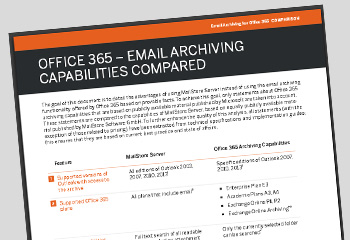
A new whitepaper is now available for download on our website.
The document compares email archiving using the integrated capabilities offered by certain Office 365 plans to email archiving with MailStore Server from Office 365.